


If you’re a student or researcher, you’ve likely encountered that frustrating “Access Denied” screen when trying to reach a legitimate website, software repository, or gaming service on campus. University networks often use strict firewalls or transparent proxies to limit bandwidth and enforce security policies, but this can severely hamper your ability to study or relax.
Cloudflare’s WARP, built on the free 1.1.1.1 DNS resolver, is an effective tool to bypass these restrictive networks.
1. Understanding the Problem: Deep Packet Inspection#
University networks do not just block websites. They often monitor and filter your traffic using two main methods:
DNS Filtering#
The network forces your device to use their local DNS server. If you try to resolve a blocked domain such as a gaming site or a non-approved software repository, the DNS request fails and you cannot connect.
Deep Packet Inspection (DPI)#
Firewalls inspect your data packets, even those encrypted through standard HTTPS, allowing them to block specific protocols or destinations.
2. The WARP Solution: Encrypted Tunneling#
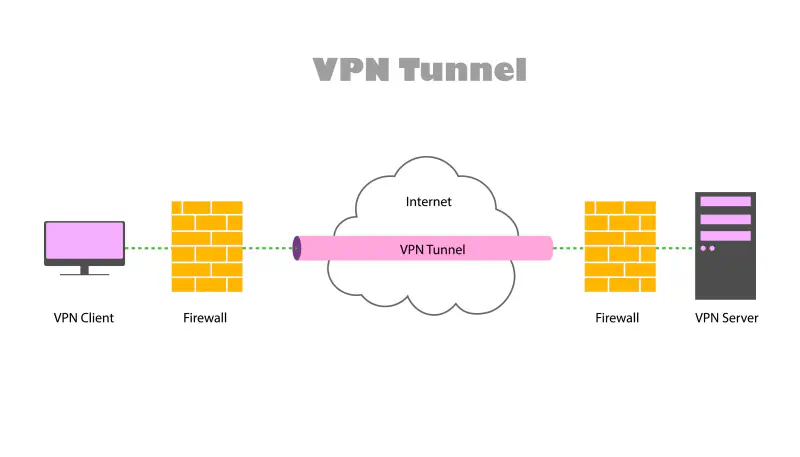
WARP creates a lightweight, encrypted tunnel from your device to Cloudflare’s network.
Encryption#
WARP wraps all your outbound traffic, including DNS and HTTP, in modern encryption.
Protocol Masking#
Your encrypted traffic appears like standard HTTPS. The firewall can only see a connection to a Cloudflare IP address, not the actual destination.
Bypassing the Proxy#
Because the traffic is encrypted end to end, the university proxy or firewall cannot inspect its contents or destination and must allow it.
3. How to Install and Connect WARP on Linux#
For Linux users, the warp-cli command line interface is the most stable way to use WARP.
Step 3.1: Install the WARP Client#
On Ubuntu:
# Add cloudflare gpg key
curl -fsSL https://pkg.cloudflareclient.com/pubkey.gpg | sudo gpg --yes --dearmor --output /usr/share/keyrings/cloudflare-warp-archive-keyring.gpg


# Add this repo to your apt repositories
echo "deb [signed-by=/usr/share/keyrings/cloudflare-warp-archive-keyring.gpg] https://pkg.cloudflareclient.com/ $(lsb_release -cs) main" | sudo tee /etc/apt/sources.list.d/cloudflare-client.list


# Install
sudo apt-get update && sudo apt-get install cloudflare-warp
Step 3.2: Register and Connect#
Register the device:
warp-cli registration new
Connect:
warp-cli connect
Step 3.3: Verify the Connection#
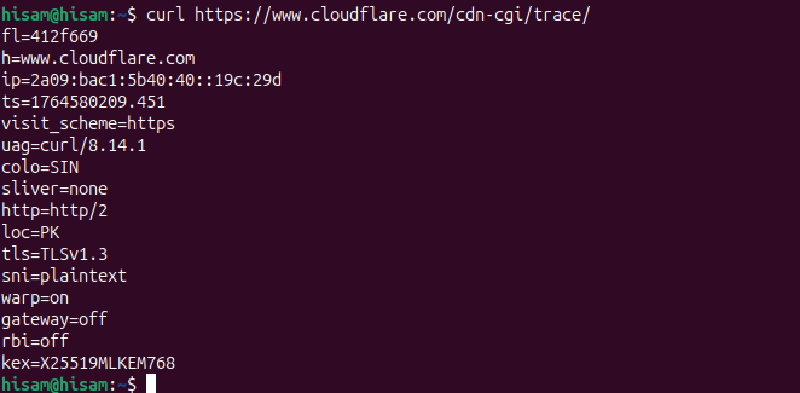
To confirm that it is working correctly, verify that warp=on.
curl https://www.cloudflare.com/cdn-cgi/trace/
4. Troubleshooting: warp=off Appearing#
If the trace output still shows warp=off, try:
Check status:
warp-cli status
Restart the connection:
warp-cli disconnect
warp-cli connect
Using Cloudflare WARP allows you to take control of your internet traffic, ensuring unrestricted access for academic and personal use while connected to a university network.
5. WARP vs. Traditional VPNs: Why WARP Often Wins on Campus#
Traditional VPNs: Primarily designed for anonymity, privacy, and geo-unblocking. They usually connect you to a specific server location (e.g., “connect to New York”) and often focus on hiding your real IP address from the websites you visit. They are designed to make it look like you’re browsing from a different country.
Cloudflare WARP: Primarily designed for security, performance, and bypassing basic network restrictions. It routes your traffic through Cloudflare’s global network to encrypt it and potentially speed it up, without necessarily trying to mask your geographical location or assign you a dedicated exit IP. It’s designed to make it harder to block your traffic, rather than to make it look like you’re somewhere else.
Full Tunneling: warp-cli establishes a system-wide VPN tunnel. This means all your internet traffic, regardless of the application (browser, terminal, game client, email, etc.), goes through the WARP tunnel. This is crucial for bypassing firewalls that might target specific applications or protocols.
Traditional VPNs: Performance can vary wildly. Connecting to a server far away will introduce latency. The encryption overhead and server load can also slow things down.
Cloudflare WARP: Optimized for Speed, which leverages Cloudflare’s vast global network, routing your traffic through the closest server.